

You start a project with an AI coding assistant and it feels like a superpower. You’re shipping more in a day than you used to ship in a week. Then the project gets big, and something turns. It edits the wrong file. It forgets a decision you made an hour ago. It rewrites code that already worked. And the simplest task — rename a function, add a field — starts eating an absurd amount of usage.
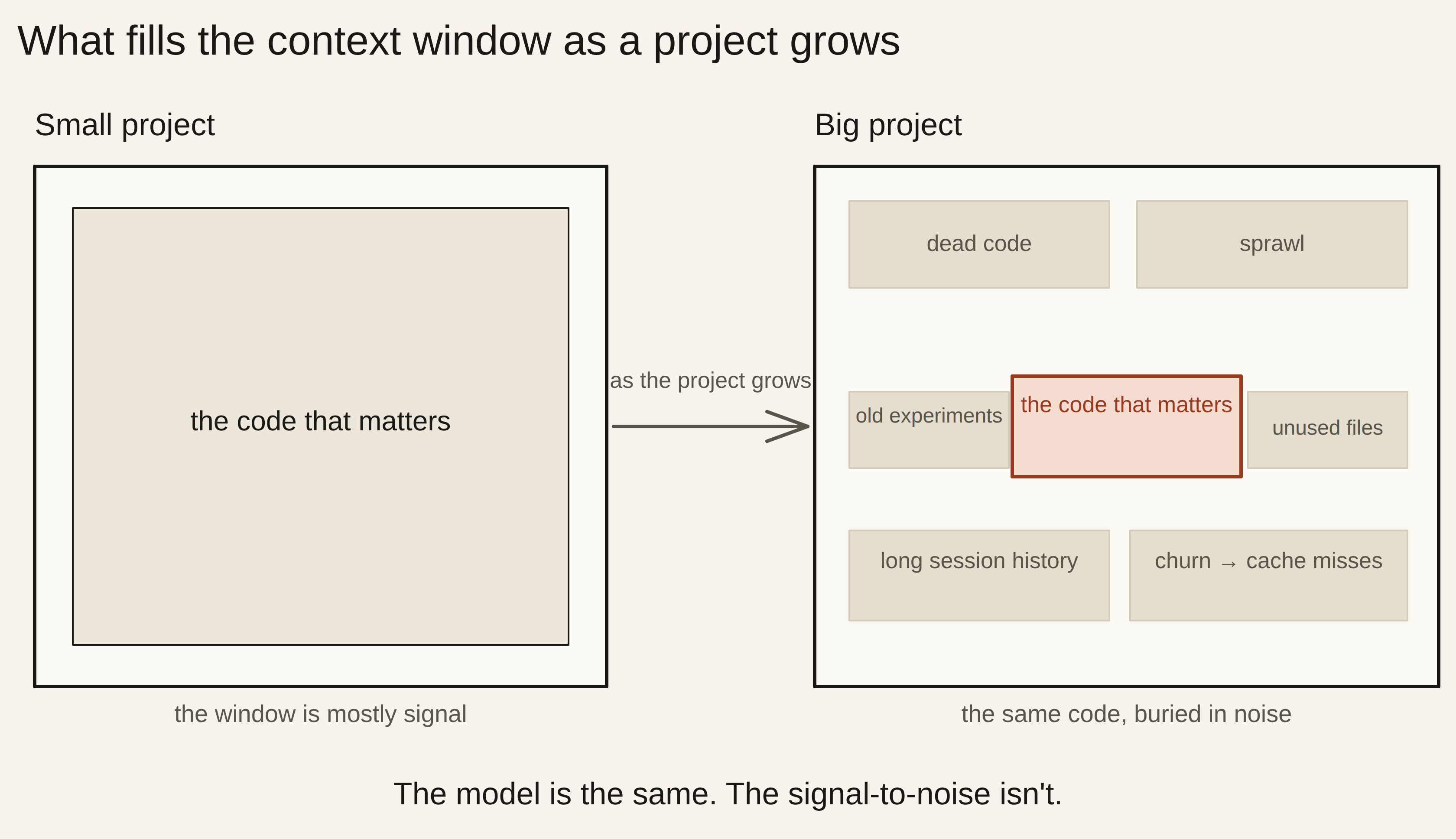
The instinct is to say the model got dumber as the project got more complex. It didn’t. The model is exactly as capable as it was on day one. What changed is the context — the pile of code and conversation you’re handing it every turn. As your project grows, that pile fills with low-signal noise, the answer you need gets buried in it, and you pay for every line the model has to wade through.
So the fix isn’t a better prompt or a smarter model. It’s raising the signal-to-noise of what the model sees. This is for you if you’re building real software with AI — Claude, Claude Code, or anything similar — and you’ve hit the wall where it stops feeling smart. If you’re writing a single-file script, none of this will bite you yet, and you can come back when it does.
What’s actually happening
A model can only “see” what’s in its context window — the block of text it reads to answer you. Current Claude models hold up to 1 million tokens at once (a token is roughly three-quarters of a word), which sounds like more than enough. The trap is assuming a bigger window means the model uses all of it equally well. It doesn’t.
Models don’t read long context evenly. The research that named this, “Lost in the Middle,” found that performance is “highest when relevant information occurs at the beginning or end of the input context, and significantly degrades when models must access relevant information in the middle of long contexts” — and that “performance substantially decreases as the input context grows longer, even for explicitly long-context models” (Liu et al., 2023). Bury the one fact that matters in the middle of a huge dump of code, and the model half-misses it.
It gets worse the longer the input runs. A 2025 study tested 18 current models and found their performance “grows increasingly unreliable as input length grows” — even on simple tasks where the difficulty never changed, only the length (Chroma). A separate benchmark put a number on it: at 32,000 tokens, 11 of the models tested dropped below 50% of their own short-context accuracy (Adobe Research, 2025). The advertised window is 1 million; the useful window is far smaller.
And irrelevant content doesn’t just take up room — it actively drags quality down. When researchers added irrelevant information to a problem, model accuracy “dramatically decreased” (Shi et al., 2023). Your dead code, abandoned files, and commented-out experiments are exactly that: topically similar, technically irrelevant, and quietly lowering the odds the model gets the answer right.
The model didn’t get dumber. Your project got noisier — and you’re paying for every low-signal line it has to read.
Anthropic’s own engineering team frames the takeaway cleanly: context is “a finite resource with diminishing marginal returns,” and “as the number of tokens in the context window increases, the model’s ability to accurately recall information from that context decreases.” The goal, they write, is to find “the smallest set of high-signal tokens that maximize the likelihood of some desired outcome” (Anthropic).
Then there’s the cost. Tools like Claude Code keep a cached copy of the stable parts of your context so repeated work stays cheap. But that cache is a prefix match — it only holds as long as the start of the context stays byte-for-byte identical. Change something early, or let the project churn enough that the model keeps re-reading shifting files, and the cache breaks; everything after the change gets reprocessed at full price. That’s the real reason a trivial task suddenly costs a fortune. It’s not the model being greedy. It’s a broken cache feeding a bloated window.
How to fix it
Every change below raises signal-to-noise. They’re ordered by how much they help, so if you do only the first three, you’ll feel it.
1. Plan before you build
Write the spec first: what you want, which files it touches, the approach. Hand it over in one clear pass instead of discovering it through ten vague follow-ups. Anthropic’s guidance for its strongest models is exactly this — give the full task up front in a single well-specified turn. Why it works: a clear target means the model loads the right small slice instead of exploring your whole repo guessing what you meant. You’ll know it’s working when it stops opening unrelated files to “get oriented” and goes straight to the ones that matter.
2. Point it at the smallest slice that does the job
Don’t ask for a feature “across the app.” Ask for one change in two named files. Break the big task into small, scoped ones. Why it works: a small, relevant context can’t bury the answer in the middle of a thousand lines that don’t matter. You’ll know it’s working when it stops editing files you didn’t mention.
3. Keep the code modular
Small, self-contained modules with clear edges mean the relevant slice is both small and complete — the model can load one piece and have everything it needs. Why it works: a tangled codebase forces it to pull in half of ten files to make one change, and most of that is noise. You’ll know it’s working when a change lives in one folder instead of rippling across the tree.
4. Keep it documented, and maintain your CLAUDE.md
A short, accurate project doc is the highest signal-per-token text you can give a model. Claude Code reads a file named CLAUDE.md automatically, and it sits in the stable, cached part of your context — so it orients the model fast and cheap, every session. Why it works: it answers the “what are the conventions here” questions before they’re asked. The catch: keep it current. A stale CLAUDE.md is worse than none — it confidently points the model at the wrong thing. You’ll know it’s working when it stops re-deriving how your project is laid out.
5. Delete dead code and do regular hygiene
Unused files, commented-out blocks, abandoned approaches — that’s pure noise in the window, and it’s the topically-similar kind that hurts accuracy most. Clean it out the way you’d clean a workbench. Why it works: less low-signal text means fewer wrong-but-plausible matches and a clearer path to the real code. You’ll know it’s working when it stops “fixing” code you forgot was even there.
6. Start fresh sessions
A session that’s been running for hours has a bloated context — and once it gets long enough, the assistant starts compacting, summarizing older parts of the conversation to make room. That summary is lossy. For a new task, start a new session with a clean, small context. Why it works: a lean window beats a long, half-summarized one every time. You’ll know it’s working when quality jumps the moment you restart on a task that was going sideways.
7. Use higher effort and a smarter model — don’t be cheap on the work that matters
Claude’s models let you dial effort from low to maximum, and a small, fast model costs less per task. It’s tempting to run everything cheap. Don’t — not for architecture, tricky refactors, or anything where being wrong is expensive. Save the cheap, fast settings for trivial edits. Why it works: the hard part of a big project is judgment, and judgment is exactly what you underpay for when you drop to a weaker model to save a few cents. You’ll know it’s working when you spend less time catching confidently-wrong changes — which usually costs far more than the model upgrade would have.
8. Own your project — re-orient yourself regularly
Every so often, read your own codebase back and rebuild your mental map of where things live. Why it works: you can’t direct what you don’t understand. Once you’ve lost the plot, the model can’t rescue you — you’ll keep handing it vague asks, and a vague ask pulls in the whole repo. You’ll know it’s working when you can name the file a change belongs in before you ask for it.
The one thing to remember
You’re not trying to make the model smarter. You’re curating what it sees. Every habit above — planning, scoping, modular code, a current doc, hygiene, fresh sessions, the right model — does the same job: it keeps the window small, clean, and high-signal, so the model spends its attention on the code that matters instead of the noise around it.
That’s the quiet shift in the work. On a small project, your job is to write the code. On a big one, your job is to manage the context — to decide what the model sees and what it doesn’t. It’s the same move behind your new job as a compute allocator and the case for directing code instead of writing it: the people who stay fast as their projects grow aren’t the ones with the best prompts. They’re the ones who treat the context window as the scarce resource it is.
Before your next big task, try the smallest version of this: spend five minutes writing the spec and naming the two files it should touch, then watch how much less it flails — and how much less it costs.
Sources
- 1Liu et al. — Lost in the Middle: How Language Models Use Long Contexts (TACL, 2023) — position in the context matters; longer input degrades performance.
- 2Chroma — Context Rot: How Increasing Input Tokens Impacts LLM Performance (2025) — 18 models grow less reliable as input length grows, even on simple tasks.
- 3Modarressi et al. (Adobe Research) — NoLiMa: Long-Context Evaluation Beyond Literal Matching (ICML 2025) — at 32,000 tokens, 11 models drop below 50% of their short-context baseline.
- 4Shi et al. (Google) — Large Language Models Can Be Easily Distracted by Irrelevant Context (ICML 2023) — irrelevant information dramatically lowers accuracy.
- 5Anthropic — Effective context engineering for AI agents (2025) — context as a finite resource; curate for the smallest set of high-signal tokens.